


To reduce battery-related complaints and verify smart door lock quality before shipment, please visit www.v-trust.com or contact us at info@v-trust.com.
For a smart door lock, battery failure is not just a power issue.
For many electronic products, a dead battery simply means the product cannot be used for a while. But for a smart door lock, battery failure may mean the user cannot enter the home, cannot unlock the door through fingerprint or app, and must rely on emergency power or a mechanical key that may not always work as expected.
This is why battery-related quality risks deserve special attention before shipment.
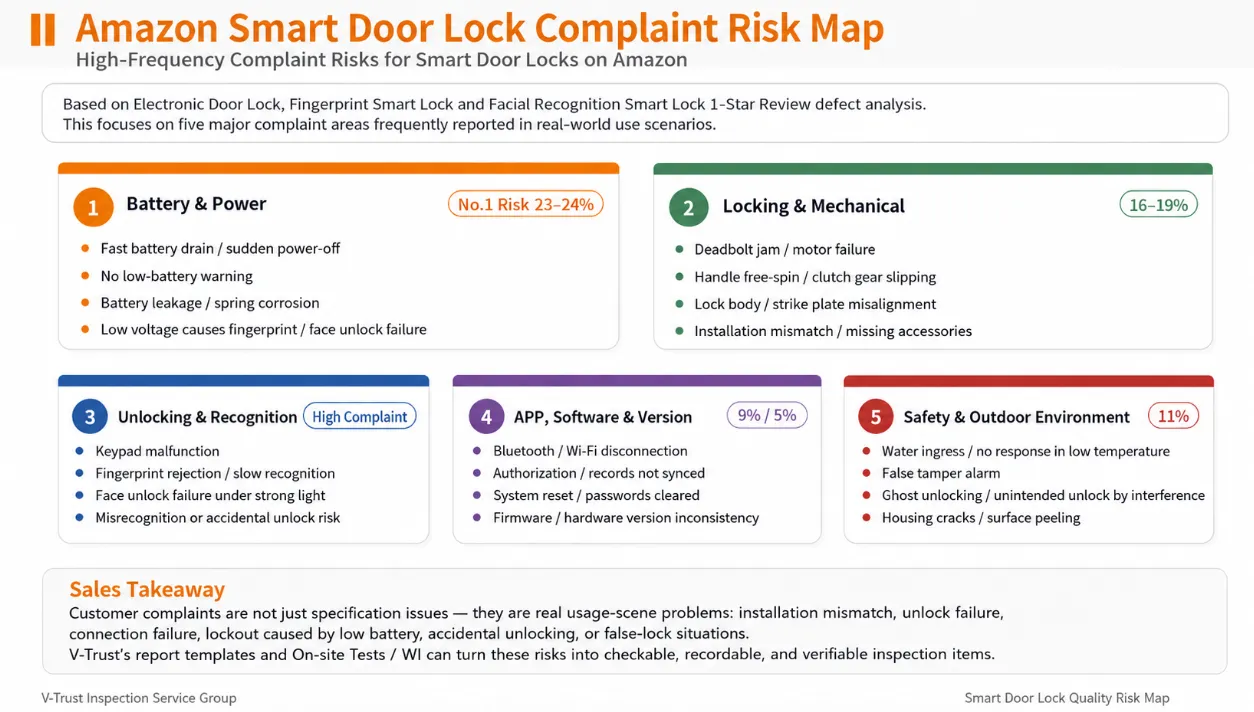
Why Battery Issues Matter More for Smart Door Locks
For many electronic products, a dead battery only means the product cannot be used temporarily. For a smart door lock, a power failure can directly become a lockout, security, return, and customer-satisfaction problem.
The battery may need to support:
- Keypad input, fingerprint recognition, or face recognition;
- Bluetooth, Wi-Fi, or APP communication;
- The motor or clutch that drives the latch and deadbolt;
- Low-battery warnings, alarm indication, and emergency activation.
Unlocking is often one of the highest power-demand moments. The biometric module wakes up, the controller verifies the user, and the motor must drive the locking mechanism. A battery may appear acceptable at rest but drop sharply under load, causing the lock to restart, freeze, or fail to complete the unlocking action.
The key question should therefore not only be: “How long can the battery last?”
The more important question is: Can the lock still work safely and predictably when the battery is low?
Common Battery-Related Quality Problems
1. Fast Battery Drain
A lock may claim several months of battery life but consume the batteries within a few weeks. Possible causes include high standby current, poor sleep-mode design, repeated wireless wake-up, unstable APP connection, or power-hungry Wi-Fi, camera, PIR, and face-recognition modules.
2. No Low-Battery Warning
The warning should give the user enough time to replace or recharge the battery. If it is missing, delayed, or inaccurate, the user may only discover the problem after the lock has already shut down.
3. Sudden Power-Off During Unlocking
If the battery voltage falls sharply when the motor starts, the lock may restart, freeze, or stop before the latch or deadbolt completes its movement.
4. Battery Leakage, Corrosion, or Poor Contact
Weak springs, loose holders, damaged terminals, humidity, condensation, or battery leakage can create intermittent power failure. A short factory function test may not reveal this problem.
5. Emergency Power Failure
A Type-C, Micro-USB, or 9 V contact may activate the display but still fail to provide enough stable power to complete the unlocking cycle. Power-on alone should not be considered a pass.
Why These Problems Happen
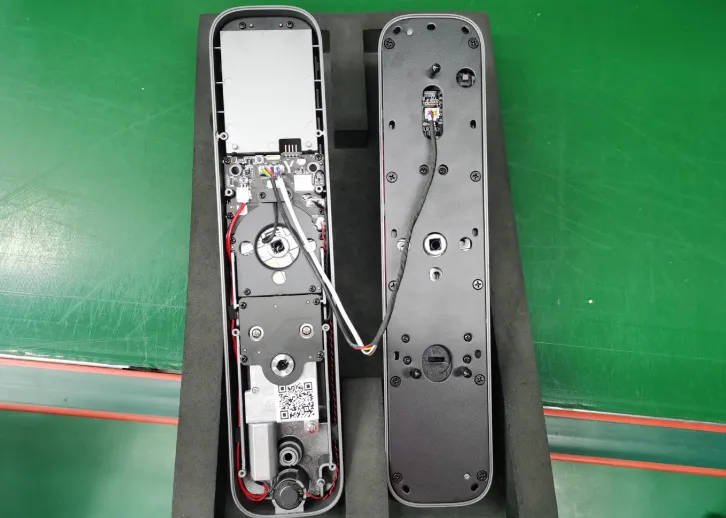
Battery-related failure is often not caused by the battery alone. It may originate from design, assembly, software logic, component selection, or process control.
- Poor battery-holder contact: weak springs, unstable contact plates, incorrect polarity, or insufficient battery fixing.
- High standby current: the PCBA, Wi-Fi module, Bluetooth module, PIR sensor, or camera does not enter sleep mode correctly.
- Incorrect low-voltage logic: the firmware checks voltage only at rest and does not account for voltage drop under motor load.
- Poor sealing and moisture protection: condensation or humidity reaches the battery compartment and causes corrosion or short circuit.
- Unstable firmware or version control: different batches use inconsistent firmware, APP, or hardware versions.
What Should Be Checked Before Shipment?
A smart door lock inspection should not only confirm that the product can unlock once under normal power. It should verify the battery condition, assembly quality, electrical behavior, low-voltage logic, and emergency access.
1. Battery Marking and Appearance Check
Check the battery or battery pack marking, including capacity, polarity, production or traceability information, and required certification or recycling marks where applicable. Inspect for leakage, swelling, deformation, corrosion, abnormal odor, damaged terminals, poor soldering, or other workmanship defects.
2. Battery Fixing and Insulation Check
Confirm that the battery, protection board, tabs, solder joints, and wiring are securely fixed. Insulation should separate conductive parts and reduce the risks of short circuit, movement, or damage during transport and use.
3. Battery Compartment and Contact Check
Check the holder, springs, contact plates, polarity direction, connector insertion, and battery-retention structure. Poor contact may cause intermittent shutdown even when the product passes a simple power-on test.
4. Working Current and Standby Current Check
Where the specification and test conditions are available, compare the measured working and standby current with the approved requirements. Abnormal standby current is one of the main causes of fast battery drain.
5. Low-Battery Indication Check
Confirm that the declared sound, light, display, or APP notification appears at the specified threshold and gives the user enough time to replace or recharge the battery.
6. Basic Unlocking Under Low-Battery Condition
Perform repeated unlocking cycles at the declared low-battery condition. No restart, freeze, incomplete motor travel, abnormal noise, or failure to report the correct lock status should occur.
Emergency Access Must Be Verified
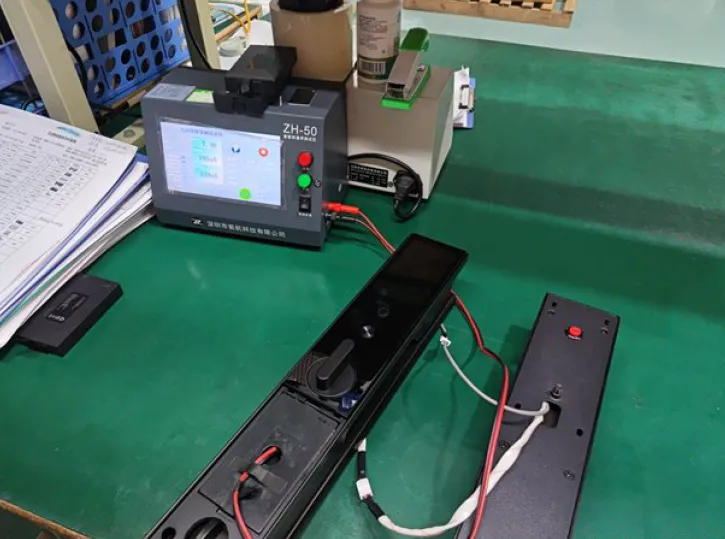
If the lock has an emergency power interface, the inspector should simulate low battery or complete power-off and connect the declared external power source according to the instruction manual.
The lock should be activated and unlocked normally. No unstable power-on, abnormal heating, looseness, or unlock failure should occur. The test must confirm the complete unlocking action—not only that the screen lights up.
The mechanical key remains an important backup method. Check that it can unlock the product normally without jamming, deformation, breakage, or failure of the lock cylinder.
Why Production Monitoring Also Matters
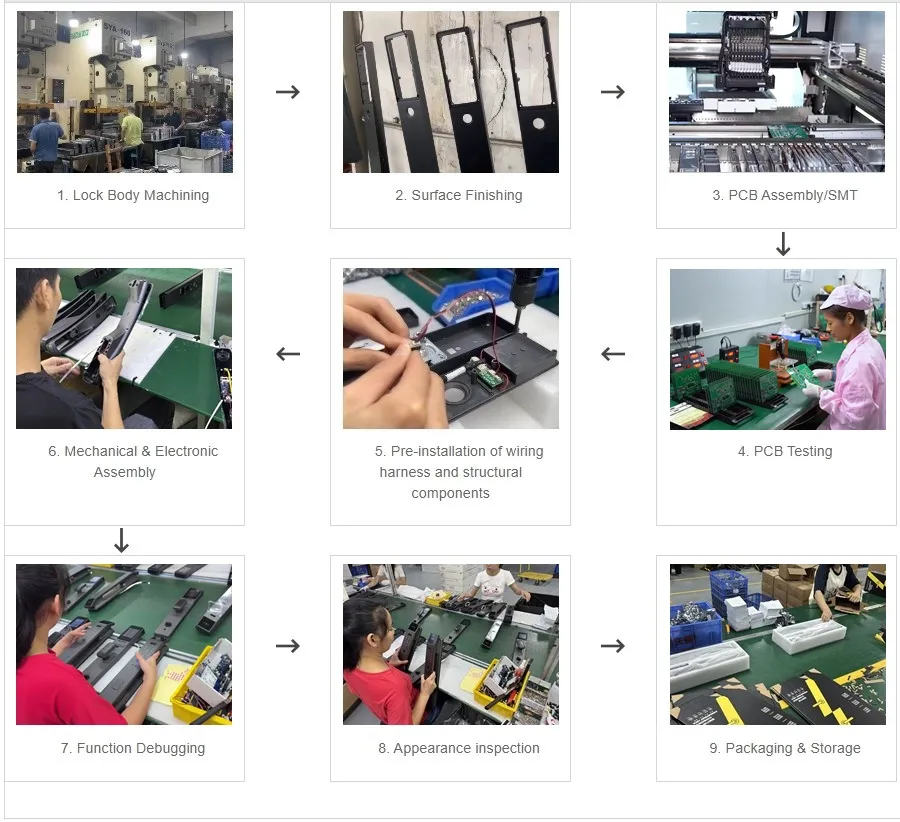
Some power-related problems are introduced before final inspection, such as during PCBA assembly, battery-holder installation, wiring-harness pre-assembly, firmware programming, function calibration, or packaging.
Key production-stage checkpoints may include:
- PCBA assembly and soldering quality;
- Battery holder installation and contact pressure;
- Wiring routing, connector insertion, and insulation protection;
- Firmware, APP, and hardware version consistency;
- Motor drive, clutch response, and unlocking calibration;
- Emergency key, power accessory, labeling, packaging, and storage conditions.
How V-Trust Helps Buyers Reduce Battery-Related Complaints
V-Trust's smart door lock quality control services focus on real product risks—not only general appearance and packaging checks.
Our inspection and production-monitoring services can help buyers verify battery marking and condition, battery fixing and insulation, current consumption, low-battery behavior, emergency power activation, mechanical-key backup, and APP/firmware/hardware version consistency.
For connected or advanced smart locks, the inspection scope may also cover APP pairing, APP unlocking, command response, authorization management, version records, and basic communication stability according to the approved requirements.
Conclusion
Battery reliability for a smart door lock is not only about how long the battery lasts. It is about whether the lock remains predictable at low voltage, functional under motor load, and accessible when normal power fails.
Before shipment, buyers should verify low-battery warning, emergency power activation, mechanical-key operation, battery contact, current consumption, battery-compartment quality, and version consistency. A proper inspection program can help identify these risks before the product reaches the market.


Discussion